
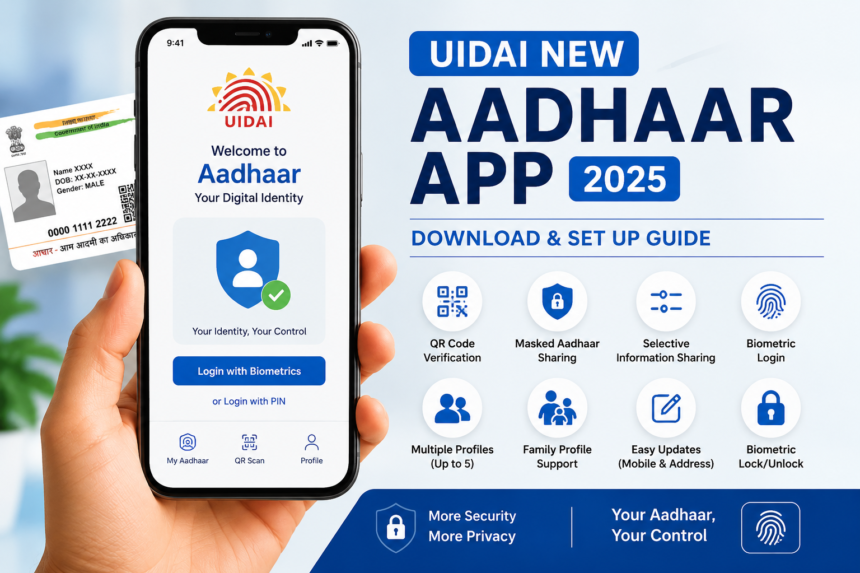
UIDAI New Aadhaar App, India’s digital identity ecosystem is evolving fast, and the launch of the new Aadhaar mobile application by the Unique Identification Authority of India marks another major step toward secure and hassle-free identity verification. Introduced in November 2025, the latest UIDAI Aadhaar app is designed to provide users with improved privacy, stronger security, and a smoother user experience.
So, how do you download and set up the new Aadhaar app? And what exactly makes it better? Let’s break everything down in simple terms.
What Is the New UIDAI Aadhaar App?
The new Aadhaar app is the official digital identity application launched by UIDAI to help Indian residents securely access and manage their Aadhaar information directly from their smartphones.
Think of it as your digital identity wallet. Instead of carrying photocopies of your Aadhaar card everywhere, you can now verify your identity digitally with just a few taps.
The app is available free of cost on both Android and iOS platforms through the Google Play Store and Apple App Store.
More importantly, the new version focuses heavily on privacy protection and controlled information sharing. That means users no longer need to reveal unnecessary details during verification.
Sounds safer already, right?
Why UIDAI Introduced the New Aadhaar App
UIDAI New Aadhaar App, Technology changes quickly, and digital security threats evolve even faster. The older mAadhaar app served users for years, but UIDAI needed a more advanced solution to align with modern cybersecurity standards.
The new app aims to:
- Improve user privacy
- Reduce identity fraud
- Enable safer digital verification
- Minimize the use of physical photocopies
- Give users more control over their data
In short, the updated app acts like a digital shield for your identity.
How to Download the UIDAI New Aadhaar App
Downloading the app is simple and only takes a few minutes.
Step 1: Open Your App Store
Android users should open the Google Play Store, while iPhone users can access the Apple App Store.
Search for the official UIDAI Aadhaar app carefully. Avoid downloading fake or duplicate applications from unknown publishers.
Always verify that the publisher is UIDAI before installation.
Step 2: Install the Official App
Tap the “Install” button and allow the app to download completely.
The application size is relatively small, so it usually installs quickly even on average internet connections.
Once installed, open the app to begin setup.
How to Set Up the New Aadhaar App
Now comes the important part — configuring your digital identity securely.
Choose Your Preferred Language
UIDAI New Aadhaar App, it will ask you to select your preferred language.
UIDAI has included multiple regional language options to make navigation easier for users across India.
Choose the language you feel most comfortable with.
Enter Your Aadhaar Number
Next, type your 12-digit Aadhaar number carefully.
Double-check the digits before proceeding because even a small mistake can delay verification.
Verify Using OTP Authentication
After entering your Aadhaar number, UIDAI will send a One-Time Password (OTP) to your registered mobile number.
Enter the OTP to verify your identity.
This step ensures that only the authorized Aadhaar holder can access the account.
Set Up Biometric Security
Here’s where the app becomes much more secure than traditional ID systems.
Users can enable:
- Fingerprint authentication
- Face recognition login
- 6-digit security PIN
Biometric security acts like a digital lock on your identity vault.
Even if someone accesses your unlocked phone, they still cannot open the app without proper authentication.
Create and Manage Your Profile
Once verification is complete, your digital Aadhaar profile is created instantly.
Users can also add family members linked to the same registered mobile number.
This feature becomes especially useful for:
- Parents managing children’s IDs
- Elderly family members
- Dependents who may not use smartphones regularly
The app supports storing up to five profiles on one device.
Top Features of the New UIDAI Aadhaar App
UIDAI New Aadhaar App, The new application isn’t just about digital storage. It introduces several advanced tools that improve security and convenience dramatically.
Let’s explore the standout features.
QR Code-Based Verification
One of the biggest improvements is QR code verification.
Instead of handing over photocopies of your Aadhaar card at hotels, airports, or service counters, users can simply share a QR code for verification.
This minimizes the risk of document misuse.
It’s quick, secure, and paperless — almost like using a digital boarding pass.
Masked Aadhaar Sharing
Privacy concerns have increased in recent years, and UIDAI seems to have listened carefully.
The app allows users to share a masked Aadhaar version where only partial Aadhaar details are visible.
This prevents unnecessary exposure of the full Aadhaar number during identity verification.
It’s similar to how banks hide portions of debit card numbers for security purposes.
Selective Information Sharing
Perhaps the smartest feature of the new app is selective data sharing.
Users can decide exactly what information they want to share, including:
- Name
- Date of birth
- Address
- Gender
- Photograph
- Mobile number
- Age status
Why share everything when only one detail is needed?
This feature gives users greater control over personal information.
Multiple Profiles on One Device
Families no longer need separate devices for digital identity management.
The app supports up to five Aadhaar-linked profiles on one smartphone, provided all accounts are connected to the same registered mobile number.
This simplifies digital management for households significantly.
Biometric Lock and Unlock Feature
Security remains the core focus of the updated app.
Users can enable or disable biometric access anytime they want.
If you suspect unauthorized activity, you can instantly modify security settings and regain control.
This dynamic protection feature adds an extra layer of confidence for users handling sensitive identity information.
Easy Mobile Number and Address Updates
Another major convenience is the ability to update certain Aadhaar details directly through the app.
Users can update:
- Mobile numbers
- Address details
This eliminates lengthy offline procedures and reduces visits to Aadhaar enrollment centers.
For busy professionals and senior citizens, this is a huge time saver.
Why the New Aadhaar App Is Important for Digital India
UIDAI New Aadhaar App, India’s digital infrastructure is expanding rapidly, and Aadhaar remains the backbone of many online verification systems.
From banking to travel bookings and government services, Aadhaar authentication plays a critical role in everyday life.
The new app strengthens that ecosystem by:
- Reducing identity fraud
- Improving secure authentication
- Encouraging paperless verification
- Enhancing privacy controls
- Supporting modern digital governance
Simply put, the app modernizes how Indians manage and protect their digital identity.
Frequently Asked Questions About the UIDAI Aadhaar App
Can I Use the New Aadhaar App on Multiple Phones?
Yes, you can install the app on more than one device. However, each device must complete separate OTP verification for security purposes.
UIDAI may restrict simultaneous active sessions to prevent misuse.
What Happens If I Change My Registered Mobile Number?
If you update your registered mobile number through UIDAI, you may need to verify your Aadhaar profile again inside the app using the new number.
Is Biometric Login Mandatory?
No, biometric login is optional.
Users can still access the app using a 6-digit PIN. However, enabling fingerprint or face authentication provides stronger protection.
Can Someone Access My Aadhaar Details Through My Unlocked Phone?
No. Even if your phone is unlocked, the app still requires biometric verification or PIN access.
This additional protection keeps your personal data secure.
Can I Control What Information I Share?
Absolutely.
The app allows selective sharing, meaning users can choose specific details instead of revealing the entire Aadhaar profile.
This feature significantly improves privacy.
The Future of Secure Digital Identity in India
The new UIDAI Aadhaar app represents much more than a routine software upgrade. It reflects India’s broader push toward safer, smarter, and privacy-focused digital services.
As cyber threats continue evolving, digital identity protection becomes increasingly important. UIDAI’s updated app addresses these concerns with biometric safeguards, selective sharing tools, and encrypted verification methods.
For users, the benefits are clear:
- Less paperwork
- Faster verification
- Better privacy
- Improved convenience
- Stronger security
The shift from physical identity copies to controlled digital verification could eventually become the new normal across India.
Read More: Best Free AI Tools in India 2026: Complete Guide for Students, Freelancers & Professionals
Conclusion
The UIDAI New Aadhaar App is a significant improvement over the older mAadhaar application. With enhanced security features, QR-based verification, selective data sharing, and support for multiple family profiles, the app offers a smarter and safer way to manage digital identity.
Downloading and setting up the app is simple, and the added privacy controls make it worth switching immediately. As UIDAI prepares to phase out older systems, users are strongly encouraged to adopt the updated application to enjoy a more secure and seamless Aadhaar experience.
In today’s digital-first world, protecting personal identity is just as important as carrying it. The new Aadhaar app helps users do both — conveniently and securely.