
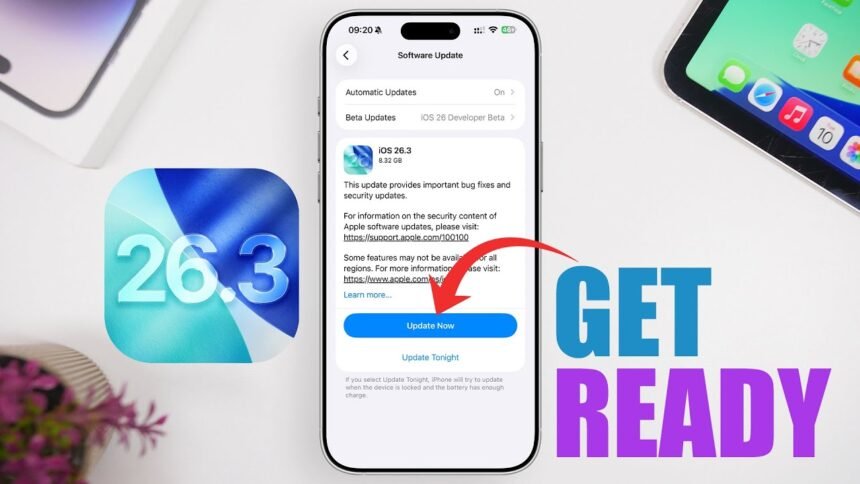
iOS 26.3 update, If you use an iPhone or iPad, the new iOS 26.3 and iPadOS 26.3 updates are not the kind you can ignore and postpone for “later.” Apple has rolled out a huge firmware package, packed with critical security patches, bug fixes, and some under‑the‑hood improvements that directly impact your privacy and everyday experience.
Think of this update as changing the locks on your house after someone found a way to peek through your windows without a key. It plugs dangerous loopholes that attackers could exploit to see sensitive content, crash your device remotely, or even tamper with its memory.
This iOS 26.3 security update strengthens your device’s defenses at every level, closing critical vulnerabilities before they can be abused. With the iOS 26.3 security update, Apple reinforces privacy protections and system integrity to keep your iPhone and iPad secure against evolving threats.
In this guide, we’ll walk through what’s new, what’s fixed, which devices are supported, and how you can safely install iOS 26.3 or iPadOS 26.3 without a headache.
What’s New: iOS 26.3 And The Liquid Glass UI
Apple is pairing the iOS 26.3 release with its next‑gen devices, including the new iPhone 17 lineup, which ships with iOS 26 and a fresh Liquid Glass UI. This new interface aims to make your screen feel more fluid and “alive,” with smoother transitions, more depth, and subtle reflections that mimic polished glass.
If you’re on a compatible older iPhone, you won’t get every single hardware‑dependent visual trick, but you still benefit from:
-
Refined animations and smoother system navigation
-
Better responsiveness across menus and apps
-
Improved stability when switching between heavy apps and media
In short, your phone should feel more like a modern flagship, even if it’s a generation or two behind.
A Huge Download: iOS 26.3 File Size Explained
The iOS 26.3 package weighs in at around 11.58GB, which is massive for a software update. This isn’t just a quick patch or minor point release; it’s closer to a deep system overhaul.
Why so big?
-
Multiple security patches across core iOS frameworks
-
Fixes for media handling, Bluetooth, UI, and system services
-
Updates aligned with new features and the Liquid Glass UI base
If you’re low on storage, don’t be surprised if your device asks you to clear space. Deleting a few large games, unused videos, or offloading some apps temporarily can help you get the update installed without frustration.
Major Security Fix 1: UI Loophole Exposing Sensitive Content
One of the most worrying flaws fixed in iOS 26.3 involves the user interface itself. Previously, someone with physical access to your iPhone could exploit a UI glitch to view sensitive content without entering your passcode.
Imagine leaving your phone on a table, thinking it’s locked and safe, while someone uses a visual trick to peek into what should be private screens. That’s essentially what this bug allowed, under the right conditions.
With iOS 26.3, Apple has:
-
Fixed the passcode‑bypass loophole
-
Hardened the lock‑screen protection logic
-
Reduced the chance of UI states leaking private content
If you care about privacy (and you should), this fix alone makes the update worth installing as soon as possible.
Major Security Fix 2: Bluetooth Denial‑Of‑Service Attack Blocked
Another serious issue patched in iOS 26.3 concerns the Bluetooth stack. Attackers could send malicious data to your device over Bluetooth and trigger a denial‑of‑service (DoS) attack.
In simple terms, a threat actor nearby could:
-
Send specially crafted Bluetooth packets
-
Crash your device or make it temporarily unusable
-
Disrupt your connections or ongoing tasks
Think of it like someone throwing a corrupt file into your wireless inbox and your phone freezing because it doesn’t know how to handle it. Apple has now reinforced how iOS processes Bluetooth content, preventing these malicious packets from taking down your device.
Major Security Fix 3: Malicious Media Files And CoreMedia
Media files—images, videos, audio—look harmless enough, but attackers often hide exploits inside them. In this case, a vulnerability in the CoreMedia framework allowed malicious media to cause serious disruption.
Here’s what was happening:
-
A hacker sends you a specially crafted media file
-
When your iPhone processes it, the app handling the file could abruptly close
-
In worse scenarios, the flaw could be abused for denial‑of‑service or potential access to memory contents
That’s like playing a normal‑looking video and having it knock out your app or, in the worst case, break open your device’s memory. With iOS 26.3, Apple has improved memory handling in CoreMedia, making it much harder for attackers to use media as a weapon.
System‑Wide Security Improvements Across Multiple Components
The new update doesn’t just fix one or two issues; it tightens security across a long list of core services and frameworks. Apple identified and patched vulnerabilities in:
-
Game Centre – Potential exposure of player data and session details
-
ImageIO – Safer processing of image formats that could previously trigger crashes or leaks
-
Kernel – Core system protection to prevent low‑level exploits and privilege escalation
-
LiveCaption – Protection around live transcription data and accessibility processing
-
Photos – Safeguards around your media library and metadata
-
Sandbox Profiles – Stronger app isolation to stop apps from accessing what they shouldn’t
-
Screenshots – Protection so captured and stored screenshots don’t leak more than intended
-
Shortcuts – Fixes to prevent automation flows from being abused for unintended access
-
Spotlight – Better handling of indexed content and search data
-
StoreKit – Safer in‑app purchase and store interaction logic
-
UIKit – UI handling tightened to avoid visual or interaction‑based leaks
-
VoiceOver – Ensured that accessibility features don’t accidentally reveal private information
-
WebKit – Critical for Safari and in‑app browsers, blocking malicious web content and scripts
In practice, these fixes mean attackers have a far smaller attack surface to work with. The everyday user might not see obvious “new features,” but behind the scenes, the walls around your data just got higher and thicker.
Which iPhones Support iOS 26.3?
If you’re wondering whether your iPhone can install iOS 26.3, here’s the full list of eligible models:
-
iPhone 16e
-
iPhone 16
-
iPhone 16 Plus
-
iPhone 16 Pro
-
iPhone 16 Pro Max
-
iPhone 15
-
iPhone 15 Plus
-
iPhone 15 Pro
-
iPhone 15 Pro Max
-
iPhone 14
-
iPhone 14 Plus
-
iPhone 14 Pro
-
iPhone 14 Pro Max
-
iPhone 13
-
iPhone 13 mini
-
iPhone 13 Pro
-
iPhone 13 Pro Max
-
iPhone 12
-
iPhone 12 mini
-
iPhone 12 Pro
-
iPhone 12 Pro Max
-
iPhone 11
-
iPhone 11 Pro
-
iPhone 11 Pro Max
-
iPhone SE (2nd generation)
If your device is on this list, you’re good to go.
iPadOS 26.3: Matching Security For iPads
Apple isn’t leaving tablet users behind. A parallel iPadOS 26.3 update brings similar bug fixes and security patches to supported iPads. So if your iPad is eligible, you should treat this update with the same level of urgency as on the iPhone.
Supported iPads include:
-
iPad Pro (M4)
-
iPad Pro 12.9‑inch (3rd generation and newer)
-
iPad Pro 11‑inch (1st generation and newer)
-
iPad Air (M3)
-
iPad Air (M2)
-
iPad Air (3rd generation and newer)
-
iPad (A16)
-
iPad (8th generation and newer)
-
iPad mini (A17 Pro)
-
iPad mini (5th generation and newer)
Whether you use your iPad for work, study, or entertainment, installing this update helps protect your data, apps, and online activity.
How To Install iOS 26.3 Over Wi‑Fi (Recommended)
The easiest way to install iOS 26.3 or iPadOS 26.3 is directly on your device over Wi‑Fi. Because the update is large, preparation matters.
Before you start:
-
Connect to a stable Wi‑Fi network (avoid mobile data for an 11+ GB download)
-
Make sure your battery is above 50% or keep your device plugged in
-
Ideally, back up your data to iCloud first
Then follow these steps:
-
Open Settings on your iPhone or iPad.
-
Tap General.
-
Tap Software Update.
-
Wait for iOS 26.3 or iPadOS 26.3 to appear.
-
Tap Download and Install.
-
Enter your passcode if asked, agree to the terms, and let the device complete the process.
The installation might take a while, and your device will restart. Don’t interrupt it—just let it finish, even if the screen stays on the Apple logo longer than usual.
How To Install iOS 26.3 Using iTunes (Manual Method)
If you prefer more control, have limited space, or your over‑the‑air update keeps failing, you can use iTunes (or Finder on newer Macs) to install iOS 26.3 manually.
Before you begin:
-
Back up your iPhone or iPad to iCloud or directly via iTunes
-
Make sure your computer has the latest version of iTunes
-
In iTunes, go to About > Check for Updates, or
-
Visit the official iTunes website to download the latest version
-
Then follow these steps:
-
Launch iTunes on your Mac or PC.
-
Connect your iPhone or iPad to the computer using a USB cable.
-
Click the device icon (iPhone or iPad) in the top‑left navigation area.
-
In the main panel, click Check for Update.
-
If you want a completely clean install, you can choose Restore instead, but this wipes your device and reinstalls the latest software.
-
-
When iTunes detects the iOS 26.3/iPadOS 26.3 update, click Download and Update.
-
Agree to the terms and conditions and wait while the software downloads and installs.
-
If prompted on your device, unlock it with your passcode to continue and complete the upgrade.
This method can be especially helpful if your device doesn’t have enough free space to handle the full update package over Wi‑Fi.
Why You Shouldn’t Delay This Update
It’s easy to treat updates as annoying pop‑ups you keep swiping away, but iOS 26.3 is different. It directly targets vulnerabilities that:
-
Expose sensitive content on a “locked” phone
-
Allow Bluetooth‑based disruption by nearby attackers
-
Let malicious media files crash apps or mess with memory
-
Weaken the security of core frameworks used by everyday apps
Think of iOS 26.3 as a security blanket that’s been stitched tighter on all sides. The longer you wait, the longer you’re walking around with open windows and doors in your digital house.
Similar Articles: India New IT Rules: 3-Hour Takedown Deadline Changes Online Content Landscape
Conclusion
iOS 26.3 update, iOS 26.3 and iPadOS 26.3 are not flashy feature drops that you update to just for fun—they’re essential security upgrades. From fixing a scary lock‑screen loophole to blocking Bluetooth‑based attacks and closing gaps in CoreMedia, WebKit, and other frameworks, this release makes your iPhone or iPad significantly safer.
You also get smoother performance, better UI responsiveness, and a system that’s more in line with Apple’s latest Liquid Glass design language, especially on newer devices. Whether you install over Wi‑Fi or via iTunes, the key is simple: don’t put it off.
Update now, lock down your data, and give your device the protection it needs in an increasingly hostile digital world.